Cursor
⭐ Editor's ChoiceAI-powered code editor and development environment.
Strengths
- Highly intuitive, AI-driven code completion and suggestions.
- Supports effective real-time team collaboration.
- Accessible free plan for individuals or small teams.
- Integrated documentation and contextual help.
Weaknesses
- Limited mobile support; no dedicated mobile app.
- Browser extension not available as of current release.
- Feature set may not match heavy customization needs of advanced IDEs.
Cursor stands out as a strong, AI-centric code editor ideal for modern development teams and startups.
Cursor is a practical, AI-powered code editor designed to enhance productivity for teams and individual developers. Its strong AI capabilities, collaboration tools, and documentation access offer an integrated coding experience, making it highly competitive among similar modern solutions like GitHub Copilot and Replit AI.
Cursor delivers a robust solution for developers seeking advanced, AI-powered code completion and real-time team collaboration in a unified, web-based interface. Its AI suggestions are contextually aware, accelerating development cycles while maintaining code quality. Compared to alternatives such as GitHub Copilot, Cursor not only matches AI completion features but also offers built-in collaborative tools and instant debugging—capabilities that streamline teamwork and problem solving directly within the editor. The seamless documentation access enhances learning, making it suitable for less-experienced programmers as well as professionals.
One of Cursor's core advantages is accessibility: a free plan makes it easy to try without financial risk, and the intuitive UI lowers the learning curve. Team-focused features give it an edge over solo-oriented tools, while integrations with GitHub and Slack help embed it into established workflows. However, power users may miss IDE-level customization, and mobile or browser extension support is currently lacking—a consideration for developers on the go or those seeking deep personalization.
Overall, Cursor is an excellent fit for software development teams craving advanced AI features, efficient workflows, and real-time collaboration. Those needing the extensibility of full-featured local IDEs or specific mobile support may require complementary tools, but for web-based collaborative coding with AI at its core, Cursor is a top contender.
 Platform Admin · 04 Jun 2026
What is Cursor?
Cursor is an AI-enhanced code editor and collaborative development environment tailored for software developers, startups, and engineering teams. By integrating advanced artificial intelligence, Cursor streamlines coding with smart code completion, context-aware suggestions, automated refactoring, instant debugging, and in-editor documentation lookup. With real-time collaboration features and intuitive workflows, Cursor helps users be more productive and ship higher quality code, faster. Designed to be compatible with popular languages and frameworks, Cursor is a strong alternative to GitHub Copilot, Replit AI, and Windsurf for developers seeking a modern, AI-first IDE.
Note: Features and pricing may vary as Cursor is regularly updated. Always check the official website for the latest details.
Top Features
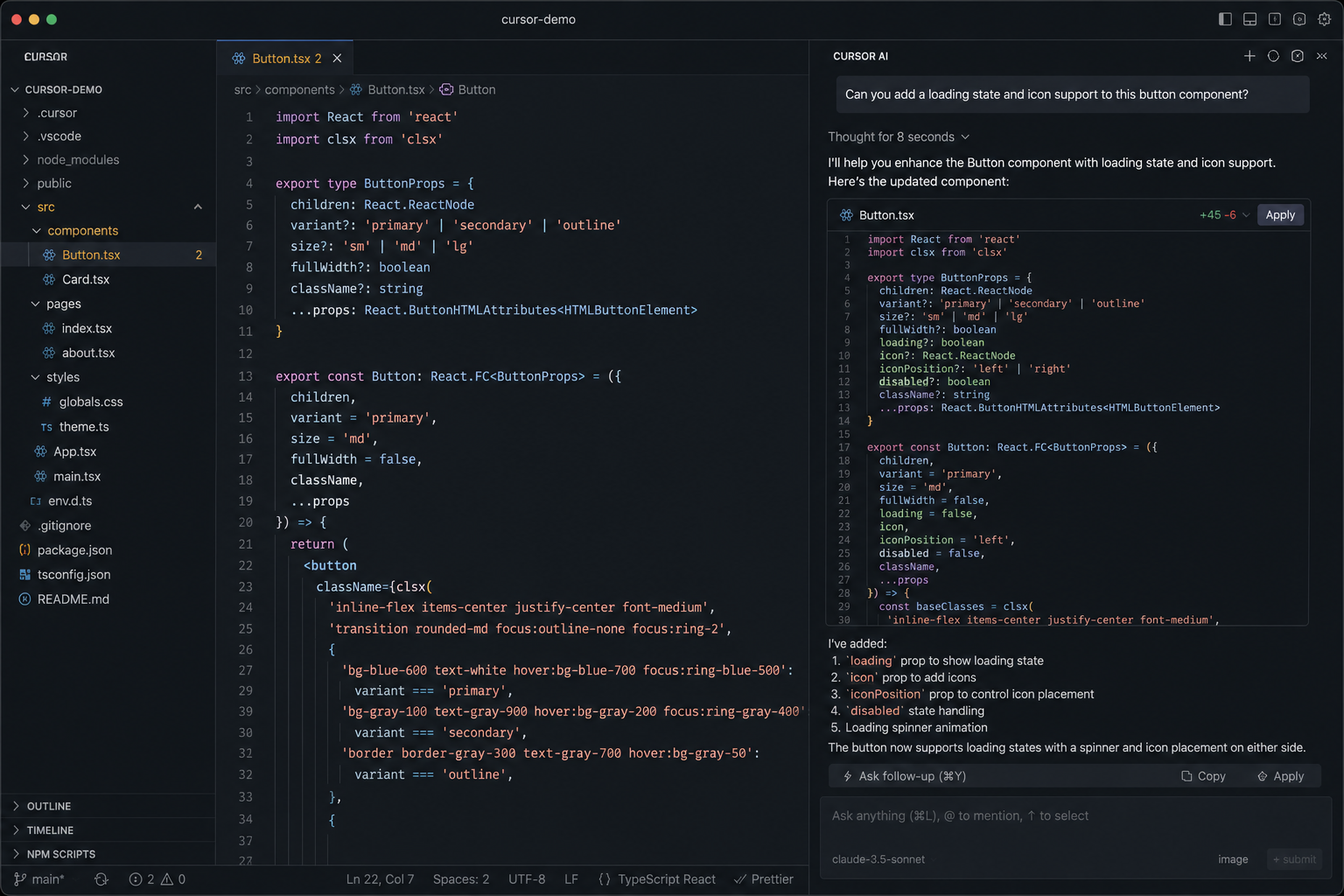
Smart code suggestions and completion powered by advanced artificial intelligence models, helping you write code faster and with fewer mistakes.
Cursor provides suggestions based on your project context, file type, and code structure to improve accuracy.
Identify bugs and get automated fixes or code refactoring directly in your editor.
Enable real-time collaboration for teams, allowing multiple users to work on the same codebase from anywhere.
Access relevant documentation and code examples directly from the editor interface.
Screenshots
Where does it fit best?
Frequently Asked Questions
Cursor is ideal for software developers, programming teams, and startups looking for an AI-powered code editing and collaboration platform.
Yes, Cursor offers a free tier with access to its core AI features. Check the official site for current limits.
Cursor offers similar AI code completion plus collaborative editing and debugging, whereas GitHub Copilot focuses on code suggestions within existing IDEs.
Yes, Cursor is beginner-friendly with user-friendly UI and contextual suggestions for learning and productivity.
Absolutely. Cursor’s real-time collaboration features are designed specifically for team environments.
Cursor supports a wide range of popular programming languages. Refer to the official documentation for an updated list.
Yes, Cursor integrates with tools like GitHub and Slack, enhancing workflow and team collaboration.
User Reviews (0)
Log in to write a reviewQuick Info
- Pricing
- Freemium
- API
- Yes
- Free Plan
- Yes
- Trial Period
- No
- Mobile App
- No
- Team Use
- Suitable
- Beginner Friendly
- Yes
- Open Source
- No