Design, train, and deploy custom AI chatbots for websites, support, and sales.
A practical guide to choosing and using AI chatbot builders to automate customer support, qualify leads, and power conversational experiences on web and messaging channels.
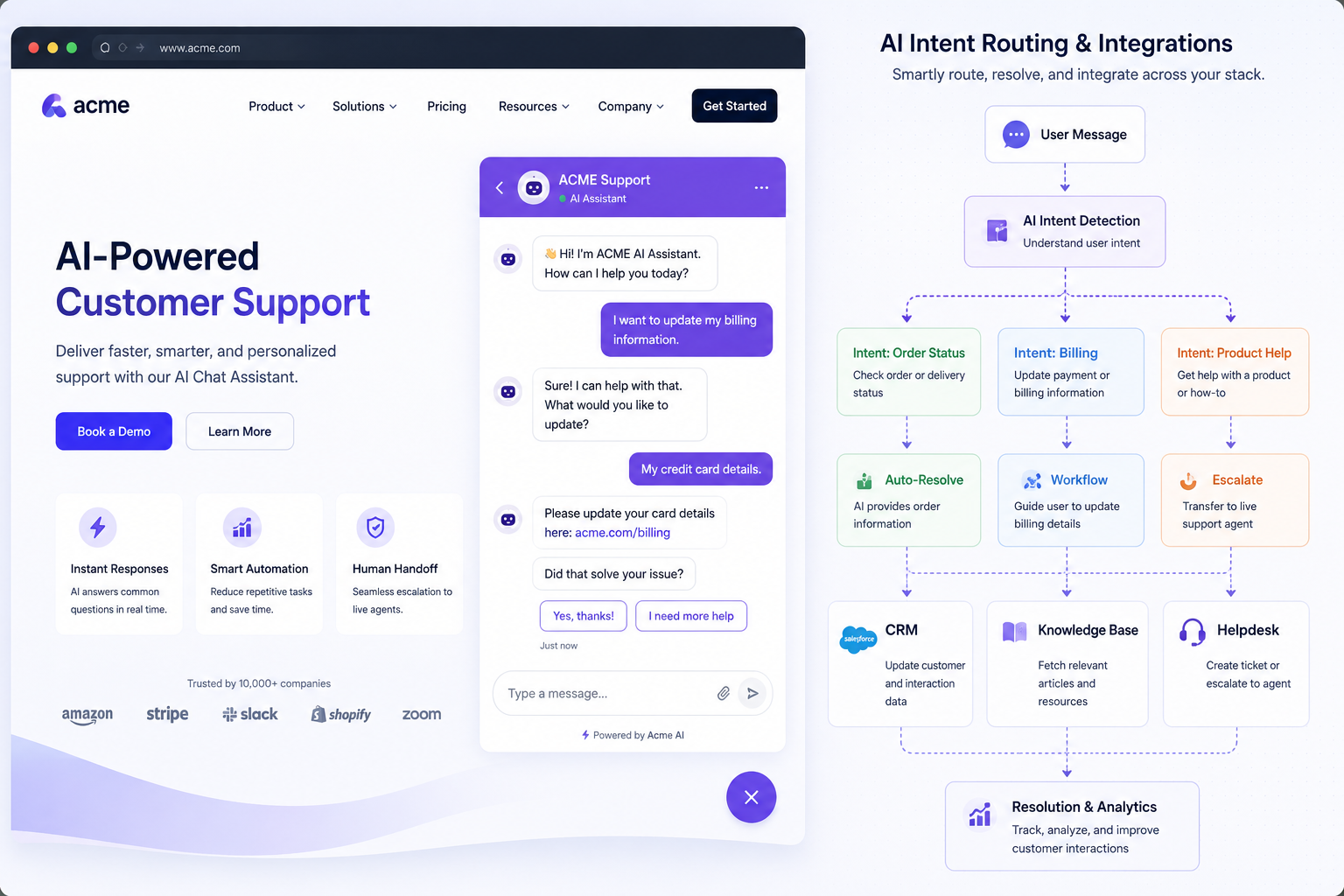
AI chatbot builders let teams create conversational agents that answer FAQs, route requests, qualify leads, and handle repetitive workflows across websites, messaging apps, and voice channels. This guide explains core capabilities, selection criteria, common workflows, recommended tool types, and comparison notes for popular options like Chatbase, Botpress, Voiceflow, ManyChat, Tidio AI, and Chatfuel. Use this to determine when to build, which platform fits your stack, and how to measure success.


When to use an AI chatbot builder
Use a chatbot builder when repetitive queries, lead qualification, or simple workflows consume significant human time. Ideal scenarios include FAQ automation, pre-support triage, appointment booking, and conversational commerce. Don’t use a chatbot builder as a substitute for complex human judgement—escalation paths and fallbacks should be planned, and a gradual rollout (pilot → measure → expand) reduces risk.
Selection criteria: what to evaluate
Compare builders by integration options (CRMs, helpdesk, analytics), channels supported, ease of training (knowledge ingestion, embeddings, RAG), customization level (no-code flows vs. access to model prompts or fine-tuning), observability (logs, transcripts, analytics), and deployment model (SaaS, self-hosted, hybrid). Factor in cost structure, concurrency limits, and compliance needs like GDPR or HIPAA if applicable.
Common implementation workflows
Typical workflows start with discovery (identify common queries), design (conversation flows, intents, fallback), content ingestion (FAQ docs, knowledge bases, product catalog), training/tuning (intent models, retrieval settings), integration (CRM, ticketing, analytics), and monitoring (accuracy metrics, containment rate, handoff rate). Pilot on a low-risk channel, collect transcripts, and iterate on prompts and content mappings.
Recommended tool types by team and use case
Marketing and sales teams often prefer no-code visual builders (ManyChat, Chatfuel) for quick chat flows and campaigns. Support teams needing tighter integration and data control may prefer hybrid or self-hosted platforms (Chatbase for knowledge-driven retrieval, Botpress for on-premises customization). Voiceflow is suited for voice-enabled experiences, while Tidio AI and similar SaaS tools offer fast deployment for small businesses. Evaluate developer APIs and SDKs if you need programmatic control.
Risks, data privacy and compliance
Key risks include incorrect or misleading responses, data leakage, and poor escalation paths that frustrate customers. For sensitive domains (healthcare, finance), prefer platforms with clear data residency controls, audit logs, and the ability to self-host. Implement human-in-the-loop handoffs, rate-limit actions that trigger transactions, and monitor model drift via regular transcript reviews.
Comparison opportunities and alternatives
When comparing vendors, weigh rapid deployment vs control. SaaS builders (ManyChat, Tidio AI, Chatfuel) often win on speed and UIs, while Botpress and Voiceflow offer deeper customization and on-prem options. Chatbase excels at knowledge-driven retrieval and can complement a scripted chatbot. Consider combining a lightweight conversational UI with back-end orchestration (Zapier, Make, custom APIs) to handle workflows that need transactional guarantees.
Frequently asked questions
An AI chatbot builder includes NLU/NLP, knowledge retrieval, and often model-driven responses that adapt to user input, while a simple chatbot uses fixed scripts and keyword routing. Builders may offer training pipelines, embeddings-based search (RAG), analytics, and integrations that enable more flexible, scalable conversation experiences.
Small businesses typically benefit from no-code SaaS builders such as ManyChat, Tidio AI, or Chatfuel because they offer fast setup, templates, and hosted infrastructure. Prioritize ease of integration with your website and CRM and look for prebuilt templates for FAQs and lead capture.
Yes — some platforms like Botpress support self-hosting, and other vendors offer hybrid deployment options. Self-hosting gives more control over data residency and auditability but requires more engineering resources to maintain and scale.
Key metrics include containment rate (percent of conversations resolved without human handoff), escalation/hand-off rate, average resolution time, user satisfaction (CSAT), task completion for transactional flows, and retention or conversion uplift for sales scenarios. Use analytics and transcript sampling to identify failure patterns.
Some do. Voiceflow focuses on voice and multimodal experiences and integrates with telephony or voice assistants. Evaluate the builder's channel support if you need phone, smart speakers, or combined voice+chat experiences.
RAG combines a retrieval layer (searching docs, FAQs, product data) with a generative model to produce answers grounded in source content. Builders that support RAG or embeddings-based search (e.g., Chatbase-style workflows) improve accuracy for domain-specific questions and reduce hallucinations.
Start by identifying the top 10–20 support intents, design a minimal happy path with clear fallback to humans, populate the bot with vetted FAQ content, connect analytics and transcript export, and run a time-boxed pilot on a single channel. Measure containment and CSAT, then iterate on prompts and routing.
Prioritize CRM/ticketing (Zendesk, Salesforce), website widget and analytics (Google Analytics, GA4), identity or SSO if personalization is required, and a backlog system for unresolved queries. Webhooks and a developer-friendly API make it easier to extend workflows later.