Fireflies AI
Record, transcribe and summarize meetings with AI-powered notes.
Strengths
- Automates recording and note-taking across major conferencing tools, saving reviewers time.
- Searchable transcripts and highlights make it easier to find decisions and quotes later.
- Integrations with CRMs and collaboration tools support sales and customer success workflows.
- Team-friendly features such as tagging, comments and task assignment reduce follow-up friction.
Weaknesses
- Transcription accuracy can drop in noisy environments, with heavy accents, or multi-language meetings.
- The free tier limits can be restrictive for high-volume teams; confirm current plan limits before committing.
- Occasional parsing errors in speaker attribution and summary generation require manual proofreading.
- Some integrations or advanced features are behind paid tiers; verify integration availability for your stack.
A practical meeting assistant for teams that want searchable transcripts and integration with sales and support workflows.
Fireflies AI automates meeting capture and turns conversations into searchable transcripts and concise AI summaries. It’s well-suited for sales and customer success teams who need CRM sync, shareable highlights and task assignment. Accuracy depends on audio quality and accents, and some advanced integrations are gated behind paid plans. Overall, it streamlines meeting follow-ups and knowledge reuse for distributed teams.
Fireflies AI positions itself as a team-focused meeting assistant: it records calls, transcribes speech, and produces summaries and highlights to make meetings actionable. For sales teams and customer success, the value is clear — recorded conversations and extracted action items reduce manual note-taking, enable faster follow-ups, and provide a searchable knowledge base for onboarding or dispute resolution. Fireflies’ integration set (Zoom, Teams, Slack, CRMs) is practical for many organizations and supports pushing notes into existing workflows. Transcription quality is generally good in clear audio conditions, but like all automated transcription tools it can struggle with background noise, overlapping speakers and heavy accents. Speaker diarization and AI summaries are useful starting points but should be proofread before sharing externally. Administrators will appreciate team-level controls and data retention options, though enterprises should validate compliance documentation for regulated use. Compared with competitors: Otter.ai is often favored for individual use and collaborative note-taking workflows, Fathom offers streamlined Zoom summaries with a lightweight UX, and Avoma leans into conversation intelligence for coaching and analytics. Fireflies’ strengths are its CRM-oriented features and searchable meeting archive. The free tier is helpful for trialing core functionality, but higher-volume teams will likely need a paid plan for full integration depth and minutes. Before committing, verify current pricing, plan limits and exact integration behavior against your tech stack. Recommended for distributed teams and managers who want to standardize meeting notes and tie conversations back to CRM and task workflows.
 Platform Admin · 05 Jun 2026
What is Fireflies AI?
Fireflies AI captures meetings across calls and video conferencing tools, automatically transcribes conversations, and generates searchable summaries and highlights. It targets sales teams, customer success, remote teams and managers who need accurate meeting records, shareable highlights, and integration with CRM and collaboration tools. Fireflies offers automated recording, speaker diarization, AI-generated summaries, keyword search, task tagging, and integrations with platforms like Zoom, Microsoft Teams, Slack, Zapier and HubSpot. Use it to reduce note-taking overhead, streamline follow-ups, and make meeting insights accessible across teams. Verify current pricing, platform availability and language support before publishing.
Top Features
Join calls automatically via calendar integrations or a meeting link to record audio and video sessions without manual start/stop.
Automatically transcribes speech into text and attempts to separate speakers for easier review and quoting. Accuracy varies by audio quality and accents.
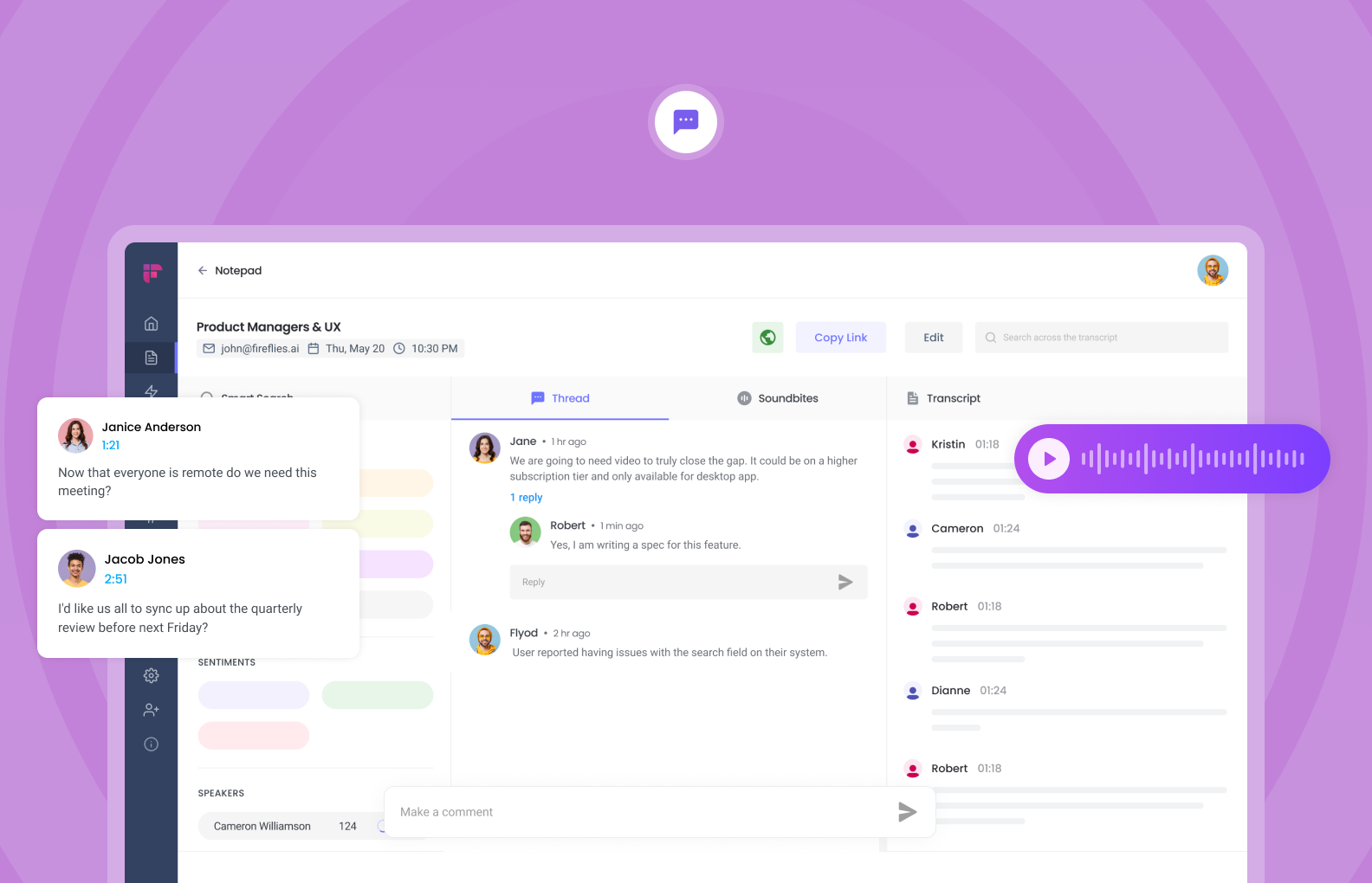
Generates meeting summaries, key takeaways and action items so teams can scan notes quickly without reading full transcripts.
Search across transcripts, highlights and tags to find past discussions, quotes and decisions. Useful for knowledge reuse and onboarding.
Add tags, timestamps, comments and assign action items directly on the transcript to coordinate follow-ups.
Push notes, highlights or tasks to CRMs and collaboration tools to keep records in your existing workflows.
Export transcripts, summaries and audio in common formats (TXT, PDF, SRT, MP3) and share links with teammates.
Admin controls for team access, data retention settings and meeting-level privacy options; review compliance documentation for enterprise requirements.
Screenshots
Where does it fit best?
Frequently Asked Questions
Fireflies can join meetings automatically via calendar invites or a join link, record audio (and sometimes video depending on platform), and store the raw recording for transcription. Exact setup steps depend on your conferencing provider and account permissions.
Transcription accuracy is generally strong in clear audio conditions, but it varies with background noise, connection quality and speaker accents. Expect to review and correct critical quotes. Consider using high-quality microphones and meeting etiquette to improve results.
Fireflies commonly integrates with Zoom, Microsoft Teams, Google Meet, Slack and others. Integration detail and depth (recording vs. data sync) vary by platform—verify exact integration features and requirements for each provider.
Yes — Fireflies offers integrations to push notes, highlights and tasks into several CRMs (e.g., HubSpot). The available fields and automation options depend on your plan and the specific CRM integration.
Fireflies offers a free tier with limited monthly transcription minutes and basic features; paid tiers add team features, advanced integrations and higher usage limits. Check Fireflies' pricing page to confirm current limits and features before choosing a plan.
Fireflies provides admin controls and privacy settings; for sensitive or regulated environments, review its security, data retention and compliance documentation (e.g., GDPR) and consult your legal or IT team.
Yes — transcripts, timestamps and AI-generated summaries can be reviewed and edited inside the Fireflies interface so teams can correct errors and refine action items.
Fireflies focuses on team workflows, integrations and searchable archives; Otter.ai emphasizes individual note-taking and collaboration, Fathom highlights lightweight call summaries integrated with Zoom, and Avoma targets conversation intelligence for sales coaching. Feature overlap is significant; choose based on integration depth, transcription accuracy for your use case, pricing and admin controls.
User Reviews (0)
Log in to write a reviewQuick Info
- Pricing
- Freemium
- API
- Yes
- Free Plan
- Yes
- Trial Period
- No
- Mobile App
- Yes
- Team Use
- Suitable
- Beginner Friendly
- Yes
- Open Source
- No