Create videos from text, images or avatars using generative AI
AI Video Generators use generative models to convert scripts, prompts, images or avatar inputs into finished video content. This use-case overview covers core capabilities (text-to-video, avatar/actor synthesis, voiceover and dubbing, scene templates, and API/batch rendering), common production workflows, audience fit (marketing, training, e-learning, social), and trade-offs (render time, cost, realism vs control). Popular commercial tools in this space include Runway, Synthesia, HeyGen, Pika, Luma AI, Kling AI and Hailuo AI; each targets different needs from photoreal avatars to stylized animations. Use this page to evaluate capabilities, integration options, and next steps for pilots or production use.
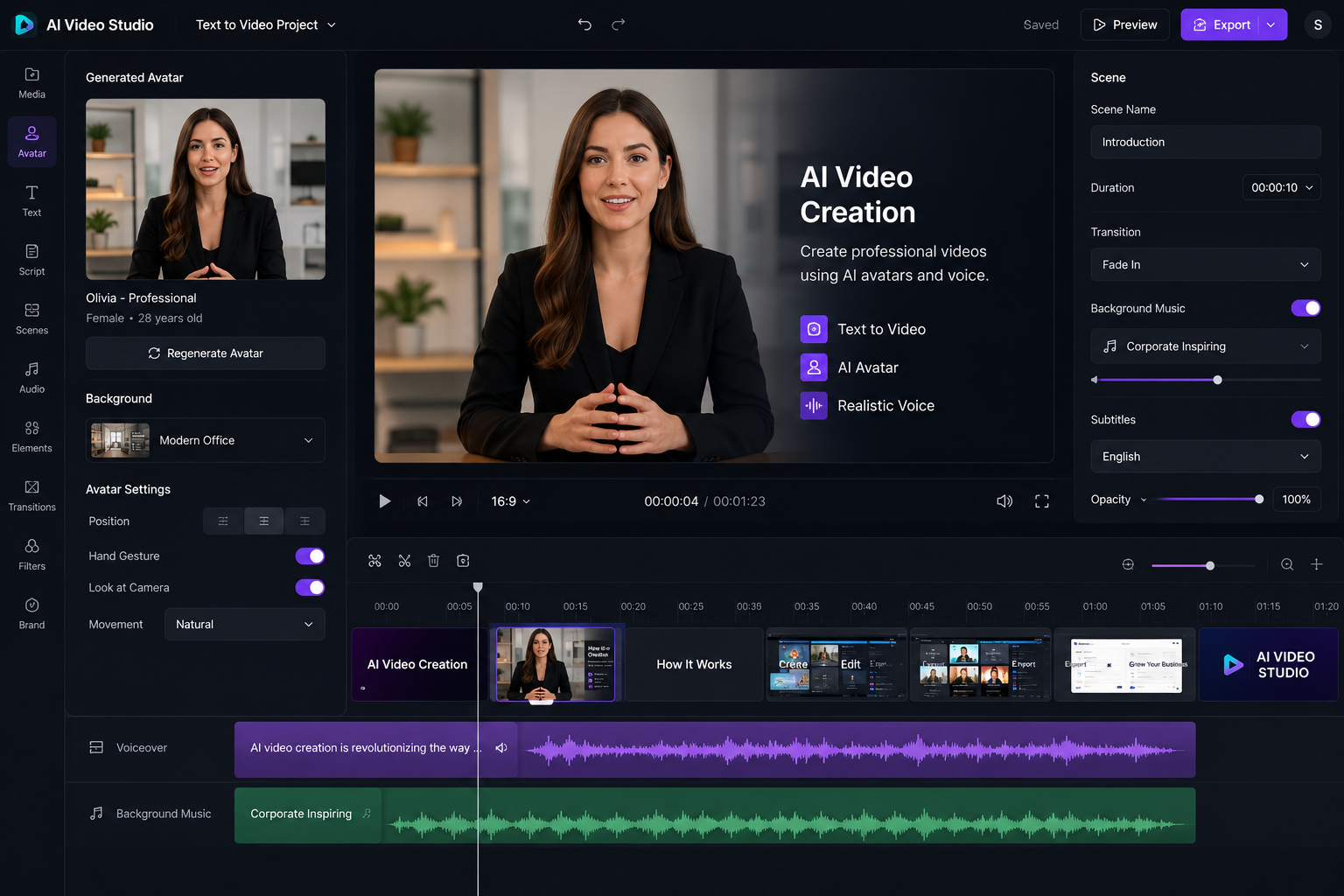
AI video generators have matured rapidly and now cover a broad set of production needs — from presenter-style avatar videos to stylized short-form clips and experimental 3D-like scenes. For teams focused on scalable content (social clips, onboarding modules, product demos), these tools reduce dependencies on studios and actors while enabling faster iteration through templates and API-driven rendering. However, quality varies across vendors and use cases. Tools like Synthesia and HeyGen are optimized for polished presenter videos and multi-language TTS, making them suitable for corporate training or internal communications. Runway and Luma AI lean toward creative editing workflows and advanced scene composition; they integrate better into post-production pipelines where manual tinkering is expected. Pika and Kling AI are attractive for quick, stylized short videos and social-first content. Practical evaluation should include: (1) pilot projects using free tiers or trials to compare voice quality, lip-sync, export resolution and template fit; (2) a review checklist for brand safety and legal consent when using likenesses or cloned voices; and (3) a cost analysis that accounts for per-minute or per-render pricing, storage and post-production time. Integrations with YouTube, Vimeo, cloud storage and automation platforms (Zapier, Slack) are common and enable near-real-time publishing workflows. Limitations to plan around include render time and variability in photorealism — you may need human-in-the-loop review, especially for customer-facing outputs. Licensing for stock assets and generated likenesses can be nuanced; legal review is recommended for campaigns using celebrity-like avatars or voice clones. Overall, AI video generators are powerful tools for specific classes of content; the right choice depends on whether speed, realism or fine-grained creative control is your priority. Consider Runway, Synthesia, HeyGen, Pika, Luma AI, Kling AI and Hailuo AI as starting points for comparison and pilot testing.
Text-to-Video / Script-to-Video
Generate scenes and animations directly from a written script or prompt, with options for pacing, scene breaks and camera moves.
Avatar & Synthetic Actors
Create talking avatars or photoreal/synthetic actors with lip-sync, facial expressions and wardrobe options for on-screen presenters.
Text-to-Speech & Multilingual Dubbing
Built-in TTS and language dubbing for multi-language outputs, often with prosody and voice-style controls.
Template Library & Presets
Reusable templates, scene presets and brand kits for quick, consistent video production.
Image / 3D Scene Import
Use uploaded images, 3D assets or generated backgrounds as scene elements or reference frames.
Frame-by-frame Editor & Timeline
Traditional timeline and frame editor for manual adjustments after AI generation.
API & Batch Rendering
Programmatic rendering endpoints and batch processing for large-scale or automated pipelines.
Quality Upscaling & Denoising
Post-render upscaling, denoising and stabilization tools to improve visual fidelity.
Frequently asked questions
AI video generators are suited for short marketing clips, explainer videos, product demos, training modules and social posts. Some tools also support longer formats but check render limits and cost before committing to long-form production.
Accuracy depends on the model, prompt quality, and post-editing. Expect better results with clear scripts, scene-stage prompts and manual timeline adjustments. For production-grade realism, plan human review and possible manual fixes.
Several providers offer free tiers or limited free trials suitable for evaluation and short clips. Free tiers commonly limit resolution, watermark exports, or monthly render minutes—verify specific plan details on vendor pages.
Using a real person's likeness typically requires explicit consent and may be restricted by vendor policies. For public figures or likenesses you do not own, check legal and vendor license terms before generating or publishing.
Match tool strengths to your needs: Synthesia and HeyGen focus on presenter-style avatar videos and polished corporate outputs; Runway and Luma AI prioritize visual editing, 3D-like scene work and creative flexibility; Pika and Kling AI emphasize rapid short-form and stylized outputs. Pilot multiple services using free tiers or trials to evaluate voice quality, lip-sync, template fit and total cost.
Consider consent for likenesses, voice cloning rules, copyright for input assets, and regional regulations on synthetic media. Implement clear labeling when synthetic actors or manipulated content could confuse viewers.
Yes—most leading platforms provide APIs, cloud rendering, or Zapier-like integrations for publishing, storage and automation. Confirm available endpoints and rate limits before integrating at scale.